I gave my coding agent a walkie-talkie
Better questions, useful context, evidence for fixes, and a local voice setup. What I took from two mornings of agentic engineering and tried afterwards.
I spend a lot of time telling coding agents what I mean. Find the right file, explain the requirement, attach the screenshot, point out the thing they missed. The code arrives quickly enough. Getting from the problem in my head to something I can actually trust is where a lot of the work goes.
On 15 and 16 October, we had two online mornings on agentic engineering with Victor Rentea at Incubyte, covering requirements, context, tools, implementation and review. Afterwards I tried one of the tools he demonstrated, Walkie Talkie, and ended up building it on my Mac, fixing its permissions and adding a hold-to-talk shortcut. That experiment is most of this story, but a few ideas from the workshop are worth trying even if you never dictate a prompt.
Start with the questions you haven't asked
The main worked example was paginating the owners grid in Petclinic, issue #25. Fairly ordinary ticket. But should pagination happen in the browser or the database? Which columns should be sortable? The implementation depends on answers that aren't contained in the word “pagination.” We spent five to ten minutes writing our own questions, then let the agent interview us with grill-me, one question at a time, each with a recommended answer. The important bit was to think through the recommendation instead of just pressing Enter. Otherwise you have technically participated in a requirements discussion while outsourcing all the requirements. Very efficient, until someone asks why the product works like that. One moment stuck with me: before simply overruling the agent on sorting, Victor gave it a database CLI so it could inspect the real data, and it then agreed about which columns shouldn't be sortable. I do this too. I know something about the application, the agent doesn't, and then I get annoyed that it reached a different conclusion. Sometimes the missing ingredient is information I never gave it.
Give the agent useful context, not everything you have
That database CLI did more than another argument about which recommendation was smarter. Changing the model doesn't fix a tool the agent can't use or a business fact it never received. The answer isn't to load everything, though. Progressive disclosure means keeping a short index of what is available and loading the detail when the task needs it, so a memory file doesn't become an autobiography of every conversation you've ever had with the agent. I would start by looking at what a new session loads before I've even asked it to do anything, and whether each part earns its place there. The same thinking applies to documents people review. The OpenSpec discussion started with who is supposed to read the proposal: keep it to why the change exists and how it should behave, and move the JSON and implementation types into the design document, so a product owner can review the part they understand.
Make the agent show its work
For code review, the recommendation was to have the authoring agent spawn a separate, adversarial reviewer before human review. When a human still finds a real problem, improve the workflow as well as fixing the code. When a UI bug was fixed in the session, the follow-up was a request for a before-and-after recording: the interaction that failed, the interaction that now works, and the test that checks it. A video still doesn't prove everything, but it is a better starting point than a cheerful “fixed.” And if a script can check a rule, enforce it in a hook or CI instead of repeatedly asking the model to remember it. A passing build is less convincing if the agent quietly removed the check that was failing.
The tool I picked up afterwards
Victor also demonstrated Walkie Talkie, his own macOS project. He wasn't asking us to install it. I saw what it could do and decided to try it afterwards. It transcribes speech locally with Whisper large-v3-turbo and adds screenshots, mouse position, selected text and browser elements to the prompt. His setup uses a LoRA trained on his voice. Mine used the stock model.
That last part is what interested me. Dictation by itself saves typing, but a lot of my prompts are about something I'm currently looking at: this button, that spacing, the error in this window. Normally I have to turn what I can see into a written explanation, take a screenshot and attach it. With Walkie Talkie, I could say “move this button here” and give the agent visual context for what “this” and “here” refer to. The exported workshop prompts show Victor using that same kind of pointing and speaking to adjust the grid.
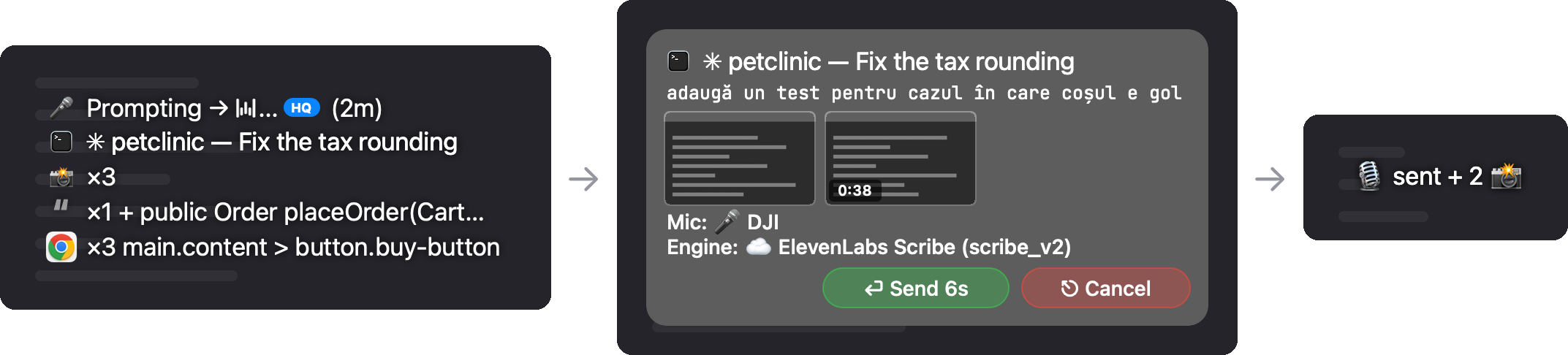
Screenshots in this post come from Victor's Walkie Talkie README.
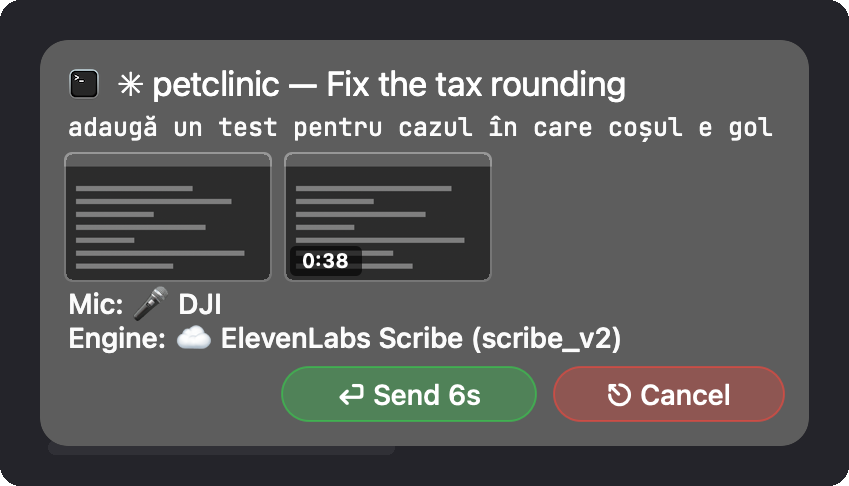
In the bound-terminal flow I used, you bind a session, dictate, then get a few seconds to inspect the prompt before it is delivered. You can cancel it or click into the text to edit it, while your eyes stay on the browser or IDE.
The context is the interesting engineering
The agent receives more than a transcript. Screenshot markers and a file legend connect the words to the captured files, with pointer coordinates to help identify what you were referring to. This is an illustrative example of that format, not a captured workshop prompt:
[📸0🖱️@1958:1511 auto]
Move the status badge beside the heading. It currently covers the text.


[📁=$WALKIE_SHOTS/example-session]
[📸0 = 📁/screenshot-0-800px.jpg, or -original.jpg]
Screenshots have a smaller copy for the agent and an original for detail. Text selections can be collected through macOS Accessibility while you're speaking, and the browser extension can attach a picked element's selector, text and URL. The README's technical walkthrough explains how they fit together.
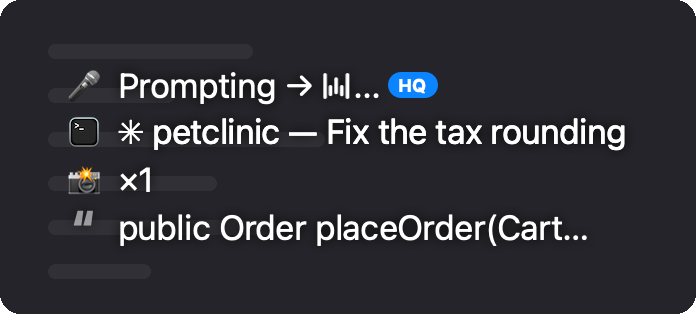
My favourite detail is the shell guard. Before delivering to a bound terminal, the app checks its foreground job and refuses targets that could hand the input to a shell. A terminal tab that was running an agent a minute ago might now be sitting at a shell prompt, and dictated input followed by Return has a very different meaning there. I want the convenience of talking to my computer. I would prefer it to remain a conversation.
The short hold before sending matters for a similar reason. Once the prompt reaches the agent, it may already be acting on it. A cancel button is useful while cancellation still means something, and the app gives you that window before delivery, which feels like the right place to catch a bad transcription.
Getting it running on my Mac
I set it up with Claude Code after the training. At the time, the build depended on a sibling package called victor-mac-kit whose GitHub URL returned a 404, already reported in issue #2. We wrote a small no-op package exposing the required API, which let the app build at the cost of the wheel-drag region crop. Full-screen screenshots, dictation, selections and browser picks still worked. I shared the workaround in a gist. Victor has since added a fix, so check the current installation instructions before copying my stub.
The other annoying bit was signing. With ad hoc signing, macOS kept forgetting the Accessibility permission after rebuilds. A stable local signing identity, plus resetting and re-adding the app's Accessibility grant, fixed that. Eventually you are still negotiating with System Settings.
Transcription runs locally on Apple Silicon with ffmpeg, mlx-whisper and Whisper large-v3-turbo, so I didn't need an ElevenLabs key. Whatever I then send to a coding agent still follows that agent's own data handling. Local dictation doesn't automatically make the whole coding workflow local.
I also wanted hold-to-talk for the bound-terminal shortcut, ⌘⌃D: hold to record, release to finish, while a quick tap keeps the existing toggle. We added that locally, and I opened issue #3 proposing it upstream.
What I actually used that evening
The logs are more useful than me saying it felt amazing. Between 19:17 on 16 October and 00:20 on 17 October, I made 148 recordings. My longest take was around 50 seconds, and decoding a sentence locally took about 1.4 seconds on my M3 Pro. That is my first evening, not a benchmark.
Only 7 recordings went into a bound terminal running an agent. They were ordinary prompts: install the Codex command, check what progress we'd made, start the next piece of work. One included a highlighted repo URL from Dia followed by “I just tried this out and this is crazy.” Another asked whether we could uninstall WhisperType now. Apparently my first instinct after getting a new tool working is to start an exit interview for the old one.
The much bigger number was 138 caret dictations: hold right ⌘ plus right ⌥, speak, release, and put the words wherever the cursor is. I used that for the Claude Code desktop app and for chat messages, including most of the conversation that produced the original draft of this article. One dictation reached 758 characters. I only used the new ⌘⌃D hold-to-talk mode once in that window, so I'm not going to pretend the feature we added was responsible for the whole experience. I came away from a training about agentic engineering and then spent a lot of the evening discovering how much I liked not typing.
There were also 7 screenshots, 10 binds and 4 cancelled takes. Even the music handling helped: when I opened the mic, the music in Dia paused, then resumed when I finished. Small things like that are what make a tool comfortable enough to keep using.
What I'm taking back to work
Five hours is enough to find something useful, not enough to make a grand productivity claim. I'm starting with voice because the friction is easy to notice and the feedback is immediate. The bigger experiment is whether I can get better at deciding what the agent needs to know and what evidence I need before accepting its work. The microphone makes it easier to give an instruction. It doesn't tell me whether the instruction was any good.